CircuitPython BoxPlot Library
uboxplot
Calculates boxplot and creates its graphical representation
Author: Jose D. Montoya
Implementation Notes
Hardware: Boards with CircuitPython >8.0.0 RC2
Software and Dependencies:
Adafruit CircuitPython firmware for the supported boards: https://circuitpython.org/downloads
- class uboxplot.Boxplot(*args: Any, **kwargs: Any)
A BoxPlot TileGrid. The origin is set using
xandy.- Parameters:
x (int) – x position of the boxplot origin
y (int) – y position of the boxplot origin
width (int) – requested width, in pixels. Defaults to 20 pixels.
height (int) – requested height, in pixels.
background_color (int) – background color to use defaults to black (0x000000)
fill_color (int) – background color to use defaults to black (0x000000)
line_color (int) – background color to use defaults to white (0xFFFFFF)
Quickstart: Importing and using UBoxplot
Here is one way of importing the
Boxplotclass so you can use it as the nameBoxplot:from uboxplot import Boxplot import displayio
Now you can create a boxplot at pixel position x=20, y=30 using:
a=[1, 1, 4, 5, 6, 7, 7, 7, 8, 9, 10, 15, 16, 17, 24, 56, 76, 87, 87]
my_boxplot=Boxplot(a, x=50, y=50) # instance the boxplot at x=50, y=50
my_group = displayio.Group()
Once you set up your display, you can now add
my_boxplotto your display.Group() using:my_group.append(my_boxplot) display.show(my_group) # add the group to the display
Summary: Boxplot Features and input variables
The
uboxplotTileGrid has some options for controlling its position, visible appearance, through a collection of input variables:position:
x,ysize:
widthandheightcolor:
background_color,fill_color,line_colorrange:
xrangeandyrangeThis is the range in absolute units. For example, when using (20-90), the X axis will start at 20 finishing at 90. However, the height of the graph is given by the height parameter. The scale is handled internally to provide a 1:1 experience when you update the graph.
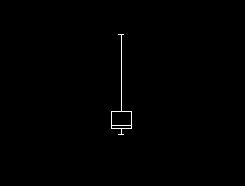
This is a diagram of a boxplot
- static find_points(data)
this function finds the quartiles, minimum and maximum for the box plot
- Parameters:
data – data to be processed
- Returns:
tuple with the values
- static normalize(oldrangemin, oldrangemax, newrangemin, newrangemax, value)
This function converts the original value into a new defined value in the new range
- Parameters:
oldrangemin – minimum of the original range
oldrangemax – maximum of the original range
newrangemin – minimum of the new range
newrangemax – maximum of the new range
value – value to be converted
- Returns:
converted value